
Large language models like GPT, Claude, Llama, and others have the potential to transform network operations. We’re familiar with how they help us generate code, summarize texts, and answer basic questions, but until recently their application to network operations has been suspect. However, it was just a matter of time until we understood the use-cases and how to mitigate some of the initial problems like hallucinations and data privacy.
I believe there are two main use-cases right now, with a third right around the corner. First, LLMs can query large and diverse datasets of network telemetry faster than any engineer, which in turn reduces resolution time and increases network performance and reliability. Second, as part of a larger workflow, LLMs can help us perform advanced analysis on network telemetry thereby providing greater insight and understanding of what is otherwise a complex web of varied telemetry data. And in the near future, agentic AI, which is really an extension of my second use case, will help us automate tasks and more autonomously manage network operations.
In this post we’ll discuss the first two use-cases and touch on the third. We’ll also unpack some of the limitations we face implementing LLMs in NetOps, and we’ll discuss several quick and easy ways to get started right now.
Probabilistic Models
First and foremost, keep in mind that LLMs are based on probabilistic models. Probabilistic models are a type of mathematical model used to predict the next item in a sequence, such as the next word in a sentence. This is based on the idea that the next word in a sequence can be approximated (predicted) by all the preceding words.

However, though LLMs are technically probabilistic, they use the Transformer model which is much more sophisticated than a strict probabilistic model like an n-gram. Transformers, which do use probabilistic techniques, rely on a sophisticated architecture of encoding and decoding as well as an attention mechanism to understand context.
Nevertheless, LLMs really have no “intelligence” as we understand it (some experts disagree), which means that though their outputs can be impressive, there’s room for error. Therefore, when we use an LLM in our NetOps workflow, we need to employ methods to make responses relevant to our specific domain as well as reduce errors.
Network Operations Use Cases
The first use-case I mentioned in the introduction is both practical and an easier way to get started compared to advanced analysis and building autonomous systems.
The first practical use for LLMs in NetOps is to make the process of interrogating very large, diverse, and divergent network datasets much, much easier and faster.
In modern network operations, we’re collecting logs, metrics, flows, and quite a bit of metadata about each of these devices individually and the traffic traversing them. Querying this data easily, quickly, in real-time, and at scale, is a huge undertaking.
Now add to this data all of the configuration files, open tickets, closed tickets, internal KB articles, network diagrams, and all the vendor documents for the devices in your racks and closets. That’s a huge amount of additional data, both in volume and type. And though it’s a different type of data (mostly text) from device and traffic information, it’s nevertheless crucial for NetOps.
This is a big problem. Unfortunately, and in spite of advances with network automation, mining through all of that data is still mostly a manual process based on our intuition and the domain-specific knowledge tucked away in our brains. I mean, as engineers we still buckle down and do it, but it takes hours, days, or weeks of clue-chaining, pouring over logs, and countless Zoom calls. LLMs can help.
One example is prompting an LLM in natural language to run a query for you. For instance, you could prompt the system to show you all network traffic egressing US-EAST-1 in the last 24 hours heading to embargoed countries. The output could be in human readable text, or if you structure your workflow properly, it could respond with a visualization.
Another example is a level 1 NOC engineer working on a ticket for a slow network. The engineer can ask the LLM in natural language if there are any devices with network problems. This is a broad question, and it assumes the LLM even knows what “network problems” means. Properly designed, an LLM in a NetOps agentic AI workflow can generate a response that the interface on an internal switch connecting to the SD-WAN edge device is dropping packets, but not quite enough to trigger an alert.
In my hypothetical scenario, I envision the network engineer as a level 1 NOC engineer who may not know the commands to access these devices, or they may not have enough experience to even think of checking interface stats in the first place. Because the LLM allows us to use natural language to query a large dataset, we decrease the process of intuitive and manual clue chaining and reduce the mean time to resolution for this incident. LLMs make accessing, filtering, and querying data dramatically easier and faster, as well as democratize information among anyone who can input a prompt into the LLM.
Using natural language to easily and quickly query huge datasets is great, but what about more advanced queries that involve analysis or inference?
A second practical use case for LLMs in NetOps is advanced data analysis.
Well, this isn’t exactly true. LLMs aren’t designed and optimized for complex statistical analysis on new data (regression, correlation calculation, time-series forecasting, etc). They aren’t meant for real-time telemetry processing, either.
However, if we use an LLM as the interface to interact with a RAG system where data processing is already done, or perhaps a workflow of AI agents designed to do that sort of analysis, then we just made advanced network telemetry data analysis dramatically easier to do – using the LLM as our user interface.
For example, we can prompt the LLM with a question that requires some sort of inference. Because the LLM understands language and therefore the nature of what we’re asking, it can create the relevant python script or SQL query, or perhaps call the appropriate tool (agent) to orchestrate a data analysis workflow.
The LLM doesn’t do the analysis, but it’s an incredible tool to facilitate the analysis workflow and report back the results in a human readable format. This use-case requires careful planning and design in terms of LLM routing, data processing and storage, how to handle real-time telemetry, and so on, but it’s another very practical use-case for augmenting an engineer operating production networks.
The third use-case for LLMs in NetOps is as the orchestrator for an agentic AI system that autonomously manages network operations.
2024 is often called the year of AI agents, and I believe that’s for good reason. There’s so much potential to use an LLM in this way. For NetOps, the LLM becomes our user interface to a complex system of agents that search, apply ML models, decide which tools to use to achieve a goal, and so on. I’ve seen network orchestration platforms come and go over the years, but I wonder if agentic AI will finally get us closer to the dream of a self-operating network.
In any case, let’s now focus on how to get started implementing an LLM for the first two use-cases (I expand upon agents a little more later and will go much deeper in a different blog post).
Implementing LLMs in a Network Operations Workflow
Implementing an LLM in a NetOps workflow is more complex than simply asking ChatGPT to generate a config snippet (although that’s definitely useful). There are many factors to consider such as cost, data management, mitigating hallucinations, and handling real-time telemetry.
Hallucinations, for example, are often the deal-breaker for engineers. From a high level, hallucinations are factually incorrect responses caused by imperfect training data and a lack of real-world grounding. This means we need to employ various methods to ensure the responses we get are relevant and accurate.
Also, LLMs aren’t well-suited for real-time telemetry processing. There’s latency in generating responses, a lack of continuous learning capabilities, and so on. So another consideration is how we ingest, process, and make available real-time data from our network.
Clearly there are some things to consider, but don’t let that stop you from trying. There are some quick and relatively easy ways we can get started right now. I’ll start with the easiest and cheapest method and make my way progressively to the most difficult, expensive, and arguably the most effective.
1. Include the Relevant Data in Your Prompt
First, the LLM needs to know about the data we care about, which is probably in an internal database the model wasn’t trained on. An easy way to do this is to include the data you want to query in your actual prompt. That could be literally copying and pasting a body of raw flow logs, SNMP data, syslog messages, device configuration files, and so on right into your prompt, then asking the LLM to summarize them or find some pattern, etc.
This is effective, but you’re limited by the number of available tokens in the model’s context window, or in other words, how many characters you can input. For many models this will be somewhere around 32,000 tokens, though some models are releasing versions with very large context windows. For example, GPT-4o has a 128k context window and Claude 2.1 has a 200k token context window. According to recent research, however, there’s a clear difference between maximum context length and effective context length, not to mention that even a 200k context window amounts to only around 500 pages of text.
So for most models, this means you can’t include all the data about your network in the prompt. Definitely some tables and smaller databases, but not the sum total of all your logs, telemetry, documentation, tickets, and so on. Strategies like summarization and filtering can help, though you should still be careful with filling up a 200k token context window because of long context issues like “lost in the middle.”
For many cases, though, this is an easy, cheap, and effective way to use an LLM in your NetOps workflow right now. Just remember that this method won’t work for doing anything sophisticated like predictive analysis.
Some practical uses for this method are summarizing syslog messages, identifying related events in a log file, or reviewing code for you that you include in your prompt. Effective, but limited to only the data in the prompt. Now let’s move on to methods to query your network telemetry databases.
2. Use an LLM to Generate a Query over Tabular Data
We can use the LLM to translate natural language to a query over tabular data you likely already have or at least can prepare relatively easily.
For example, you can use an LLM to generate a human readable prompt to a python script that runs a pandas operation, executes against a dataframe, the result of which the LLM can interpret and return in a human-readable format.
The simplified workflow looks like this:

You can also use the LLM to translate an engineer’s prompt to SQL. For example, you can input a natural language query such as “show me all network traffic from the last week where the bandwidth exceeded 1 Gbps.” The LLM translates this into an SQL query and routes the query to the relevant database for you.
This workflow looks pretty much like this:

To do this programmatically (instead of just using the LLM as a coding assistant), we can use a simple web front-end that takes your natural language prompt, augments the input behind the scenes with a template of instructions for the LLM to create a certain type of query, like in SQL as the example above, and return the results in a certain format, such as JSON.
With that returned JSON output, you can get back human-readable text or generate a visualization. The power here is making running queries extremely fast and easy using natural language. Your team can create very complex queries without needing to know how to code, you can limit the access to the data based on role, and you can present the results to the engineer in a way that makes the most sense.
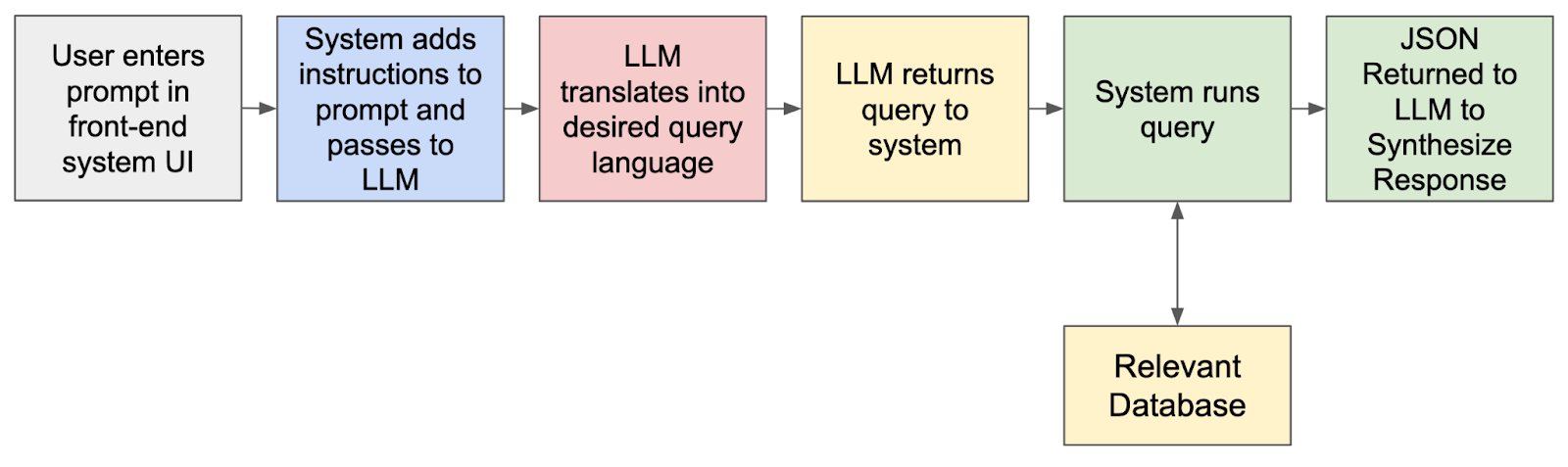
Of course this is a very high level overview and assumes the type of data / database you have lends itself to this method. In production, this can be more complex and should include a caching component that allows you to append your previous prompts. This is a great way to utilize an LLM very quickly in the real-world and with real results without having to build a RAG system with a vector database, which we’ll talk about next.
3. Retrieval-Augmented Generation (RAG) with a Vector Database
Another method is to use a RAG system with a vector database. RAG (retrieval-augmented generation) is a workflow in which we point an LLM to an external database so that the LLM is limited to only the data we care about and insert relevant context data into the prompt to tighten the LLMs ability to respond. This doesn’t always have to be a vector database in that we can retrieve data and enrich a response without a vector database. But in this section I’d like to focus on this very popular and effective way to make using an LLM relevant to your specific knowledge domain or organization and reduce hallucinations.
It’s important to understand that RAG is the mechanism the LLM uses to respond to your prompt, not perform data analysis. Neither does it prepare your external database in any way. So as it turns out, using RAG is almost as much an exercise in data management and processing as it is augmenting an LLM.
Based on what kind and how much data we’re dealing with, we select the appropriate embedding model to transform our data (in our case network telemetry, logs, configurations, etc) into embeddings, and then select the most appropriate vector database (like Pinecone, Milvus, or Chroma) to store those embeddings.
The LLM is then programmed to answer prompts only in the context of this new database, sort of like an open book test. In other words, when we input a prompt, the LLM augments its response by retrieving the data for the answer from only the data we tell it to use, thus generating a more accurate response.
This is an excellent way to use LLMs in many different industries, especially if the external database is mainly text-based. If we’re talking about diverse data types, as is the case with the networking industry, this is more complex than just pointing an LLM to an external database. And there are some limitations to RAG, especially for network operations, including retrieval not always being contextually accurate.
The high level workflow is very straightforward:
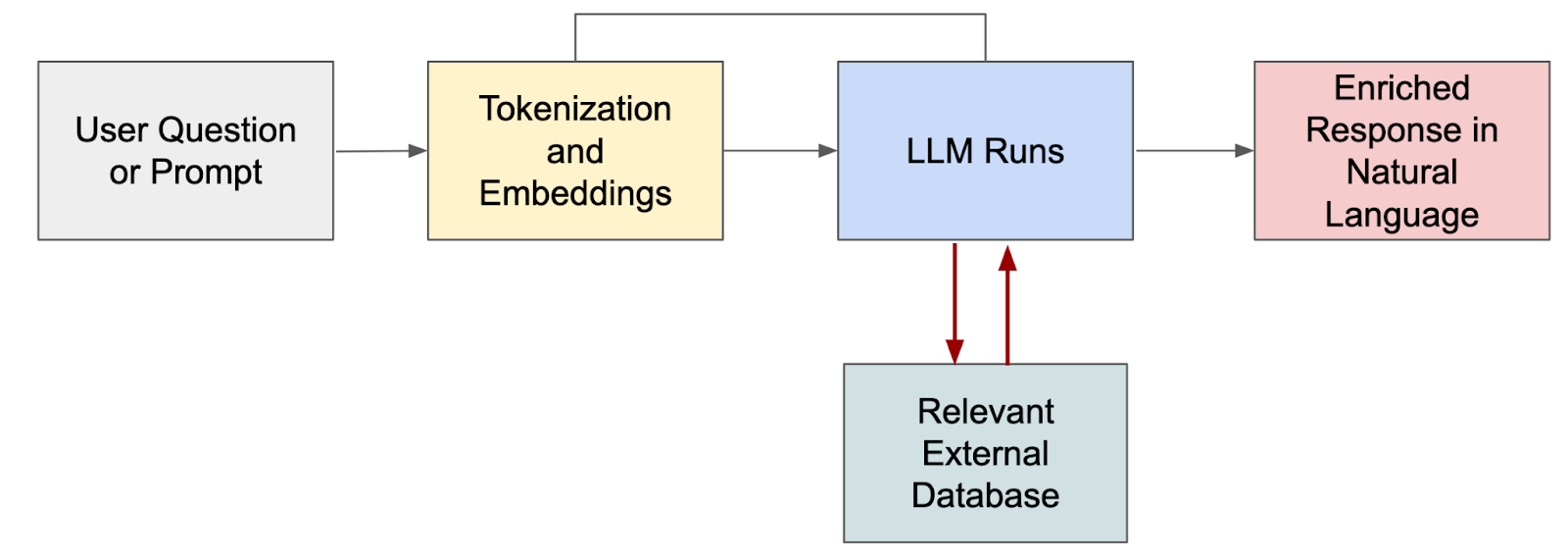
The enriched response we see on the right is the LLM responding to the prompt using the data in the RAG database. This means we can limit the LLM to respond to the data we care about like our database of flow logs, metrics, configurations, tickets, and so on. There are various ways to accomplish this, too. For example, the vector database may be searched for relevant documents prior to the prompt going to the LLM, in which case the LLM receives the prompt along with the contextually relevant information to synthesize its response.
A great way to start with RAG in NetOps is to use it for asking natural language questions against a knowledgebase, log collection, or ticketing system. Start with text data in just one database and experiment with how to get the results you want. It gets more complicated when dealing with multiple types of network telemetry, especially real-time data, so consider starting with a more simple chatbot for your internal kb.
For example, a straightforward implementation for an AI chatbot without having to get into dealing with real-time telemetry data could be a chat interface for your ticketing system. You can use natural language to open, update, create, and search for tickets easily and quickly.
4. Agentic AI
This is a more complex method for using an LLM in NetOps, but one that I believe will change the way we run networks. In an AI workflow of independent AI agents, an LLM would act as an orchestrator that translates prompts and results, routes tasks to agents, and possibly assists agents in tool calling to interact with external systems, enabling them to take actions and retrieve data. In this workflow, the LLM is an important part of an overall system.
In the graphic below you can see that the LLM interacts with other AI agents which could be web searches, other databases, ML models, and so on. In practice, the LLM would likely decide based on a semantic understanding of the prompt which agent it would forward to next.
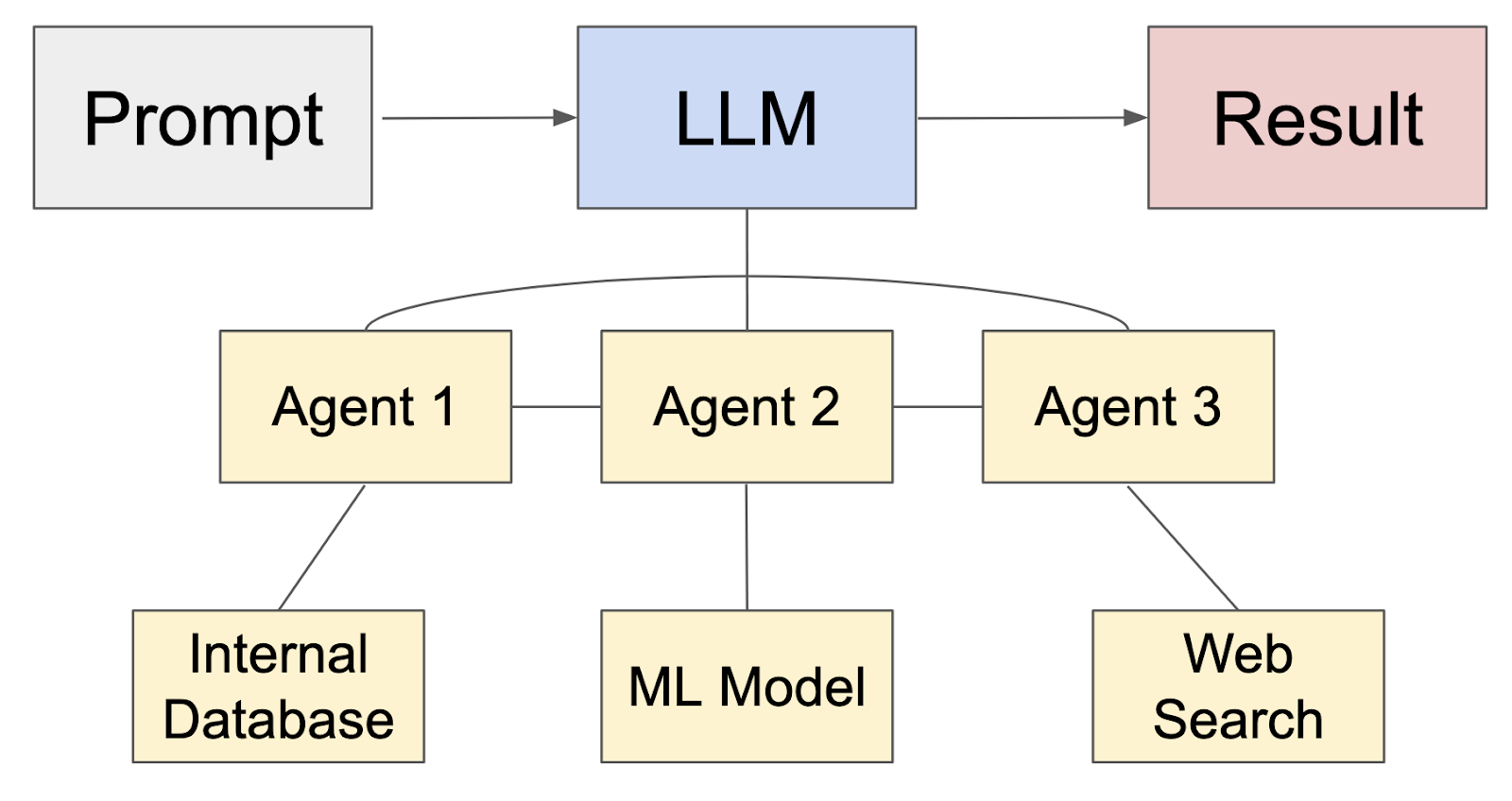
I believe we’ll see a lot of value to our industry as we develop agentic AI systems with LLM orchestrators. I know we’ve had various network orchestrators and promises of automated remediation for years, but I believe applying agentic AI to NetOps has a very real potential to revolutionize the IT industry.
5. Fine-tuning and Retrieval-Augmented Fine Tuning
Fine-tuning a model is generally expensive, time-consuming, and often requires your own GPUs. Fine-tuning adds additional data to the pre-trained model (like network domain data) so that the model’s parameters can be adjusted and it can respond accurately about what you care about.
Though this is totally doable with smaller models, techniques like LoRA, and rented GPUs like Azure AI Studio, this is much more difficult and expensive to do with foundational models like GPT and with real-time telemetry.
Retrieval-Augmented Fine Tuning, or RAFT was developed very recently (June 2024) to combine the benefits of fine-tuning with RAG to make fine-tuning easier and cheaper and RAG more effective. RAFT is something we can use today to make LLMs more accurate, and therefore more effective in a NetOps workflow. But this method is more expensive and complex to implement than RAG alone or using an LLM to generate your queries, and I still foresee a problem handling real-time data.
Nevertheless, fine-tuning and RAFT is another way to improve the relevance and accuracy of responses of LLMs such that they are more useful for query and inference of diverse network data.
Getting Started
All of that being said, I do think that many of us in network operations are still trying to really nail down the long term value and how we can actually implement LLMs into our workflow. Today, toward the end of 2024, I think we’re in a good place to start experimenting with technology and adopting it into our NetOps workflows. I think a major challenge, though, will be to figure out how to do it with the very unique, diverse, and real-time data we have in networking.
In spite of these challenges, I believe there is value in incorporating an LLM in your NetOps workflow right now, and these methods can help you get there. This isn’t an all-or-nothing proposition, either. Experiment with a pilot project to query only one type of static internal data (even if it’s fake), like a week of device metrics from some switches.
Then try different methods to use an open small scale LLMs like Llama to query it. Build a RAG system for text data only, and use free tools like Ollama, Langchain, Llama, Milvus, Pinecone, Chroma, and maybe a free embedding model off the Huggingface website. There are a ton of free tools out there and just as many blog posts from folks building this out for their own domains.
Here’s a quick-start process I’m working on (I’m on step 2):
- Experiment with querying a small, static dataset of logs or tickets using an open-source LLM like Llama
- Build a basic RAG system using text-based internal KBs and free vector databases like Pinecone or Chroma.
- Experiment with agentic AI by setting up a simple orchestrator that triggers alerts based on LLM output.
- Experiment with fine-tuning a small model like Mistral 7B (or anything very small) using a relatively small dataset. You can do that right on your laptop if it’s decent, or you can use a service like Azure AI Studio.
Thanks,
Phil

 {networkphil}
This was excellent!
thank you
LikeLiked by 1 person