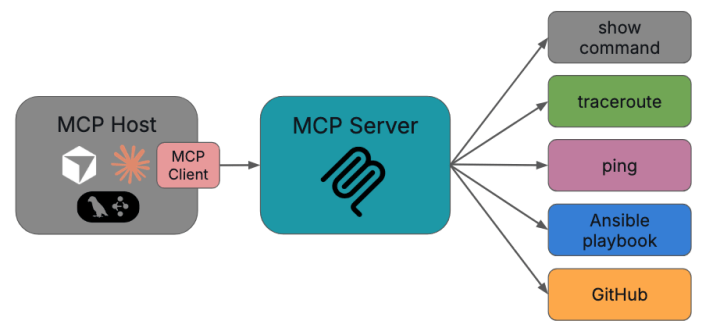
If you work in technology long enough, every new framework starts to sound like “yet another API layer.” The Model Context Protocol (MCP) is different. It’s not a product, and it’s not tied to any one vendor or model. It’s an open standard for how AI apps talk to tools and data providing a standardized, model-agnostic way for AI apps to access external tools and data.
What is MCP?
If you’ve been following the rapid evolution of AI tooling, especially now that everyone’s talking about agents, you’ve probably noticed a pattern. Every AI application seems to need its own custom integration for each data source, API, or tool it wants to access. That doesn’t scale, so it limits the usefulness of AI applications in real-world scenarios.
At a high level, MCP is a protocol that lets an AI application (like Claude Desktop, a local instance of Llama, an IDE plugin, or a custom NOC assistant) connect to external tools and systems like flow record databases, IPAM, config repos, ticketing systems, email clients, calculators, show commands, etc, through a consistent, standard interface.
Instead of every AI app inventing its own way to call a tool or a specific function like “get interface stats from Prometheus” or “run traceroute between host A and host B” or even “open a ServiceNow incident,” MCP provides a framework for several things:
- describing an available tool including what it does, what input it expects and so on
- how you can expose data as resources
- how to share prompts as reusable templates
- and what the actual format for the messages for communication should be.
What this means is that once you build an MCP server that exposes your network tools, any MCP-aware AI client can use them. That could be your NOC chatbot, a VS Code plugin for network engineers, or even a future vendor product you haven’t bought yet.
The Basic Architecture
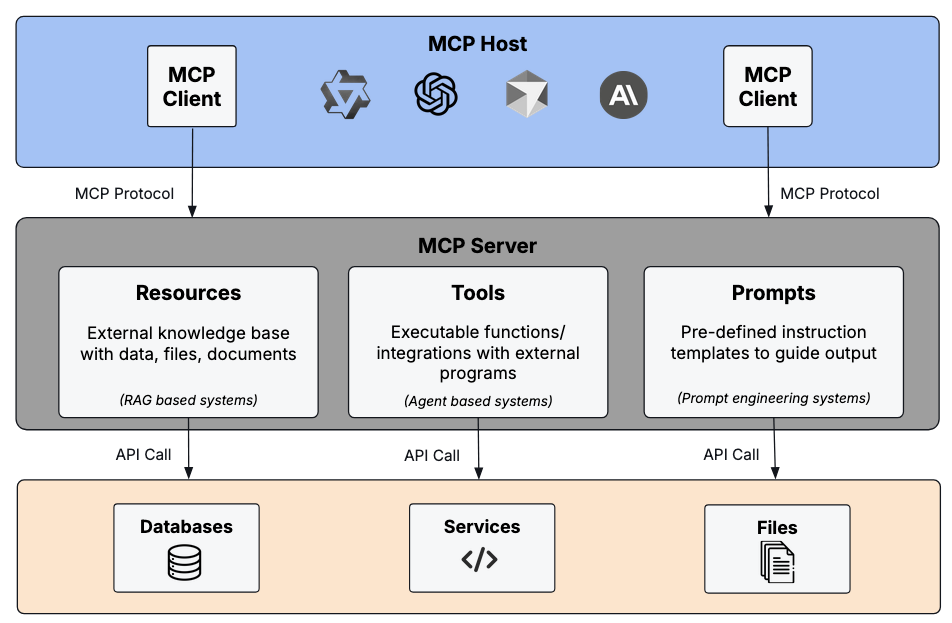
MCP follows a simple client–server pattern with the addition of one additional concept, the MCP host.
- An MCP host is the main app users interact with. It’s any environment that can load one or more MCP clients (Claude Desktop, a custom web UI for your NOC, a Python agent framework like LangGraph and CrewAI, etc).
- An MCP client is a component inside the host that manages one connection to one MCP server. It’s basically the connection bridge between the host and the server.
- An MCP server is a program that exposes tools, data, and prompts.
One host can connect to many servers. For example, a “NetOps Copilot” host might spin up three MCP clients, one for various activities with your ticketing system, one for all of your telemetry sources and activities, and perhaps another for your configs. Each client maintains a one-to-one connection to its server, but the host orchestrates them all.
Data Layer (what the messages look like)
Under the hood, MCP uses JSON-RPC 2.0. Every interaction is a JSON message with a method name, optional parameters, and an ID when a response is expected.
The protocol defines three main primitives that servers expose including tools, which are executable outcomes, resources, which are read-only data for context, and prompts, which are the reusable prompt templates.
Tools, resources, and prompts are all described with JSON Schema, so the AI client knows exactly what arguments are required and what kinds of data it will get back.
A typical flow between a NetOps assistant (host) and a telemetry MCP server might look like this:
- On startup, the client sends initialize to negotiate protocol version and capabilities.
- The host calls tools/list and sees a “get_loss_and_latency” tool with an input schema of {src_prefix, dst_prefix, time_range}.
- When a user enters “why are VoIP calls choppy from New York to Austin?”, the LLM decides to call that tool with appropriate arguments via tools/call.
- The server queries the appropriate telemetry stores, returns structured JSON in the content field (such as loss, latency, jitter, top contributing links, etc).
- The LLM uses that result to explain the problem, suggest next steps, or even chain into another tool call (like opening a ticket).
Notifications are also part of the data layer. For example, the server can send a notification that new tools were added, and the client will re-list them.
Transport Layer (how it actually moves)
The protocol separates what is said (data layer) from how it travels (transport layer). The two transports used today are Stdio and HTTP transport.
Stdio transport is basically the client and server talking over stdin/stdout of a local process. It’s great for things running on your local computer or in a local container (Claude Desktop and a local “show commands” server that SSHes into your lab routers).
Streamable HTTP transport is when the client sends JSON-RPC requests via HTTP POST. Responses can stream back using Server-Sent Events (SSE). This is ideal for remote servers, such as an MCP server running in your data center that hosts Prometheus, NetBox, and your change management API.
The cool part here is the JSON format is identical for both transports. You can prototype a NetOps server locally over stdio, then later deploy the same code behind HTTPS with auth and the client won’t care, as long as the transport is configured correctly.
Security and Governance
MCP itself isn’t a full security framework, but it has several hooks that let you enforce good security and governance practices.
Transport-level security
For HTTP transports you can (and should) use standard web security like TLS for encryption, API keys, or custom headers for auth. You can also use OAuth to get tokens when they’re needed. Because the protocol is HTTP-based in that mode, you can put MCP servers behind API gateways or WAFs just like any other service.
Roots and scoping
Clients can declare roots which are file-system directories that a server should treat as in-scope. For example, your NetOps MCP server might be told:
- /var/log/network/ – allowed logs
- /etc/network/configs/ – allowed configs
Roots are advisory, not hard security boundaries, but they’re a useful coordination mechanism so servers don’t wander outside the intended areas.
Human-in-the-loop and permissions
MCP strongly encourages user oversight in a few ways.
First, tools can require explicit approval before execution (“Do you want the AI to push this ACL change?”).
Second, servers can elicit information from the user through structured prompts when they need confirmation or extra data.
And third, clients can keep an audit log of every tool call and result.
In a NOC, that means you might let the AI recommend config changes and auto-generate tickets, but still require a human to approve anything that touches production.
Using MCP in a Real NetOps Environment
So how do you actually use this in production? This is where it gets fun.
Start simple.
Even before getting into using AI for NetOps, when learning a new technology or experimenting with a new architecture, I’ve learned to start by keeping things very simple. My recommendation is to start with one or two MCP servers that serve only a few tools. For NetOps, pick high-value systems where AI assistance makes sense.
The first example could be a telemetry/observability server, which would be tools for querying time-series (loss, latency, utilization), resources that expose internal documents, and prompts for common troubleshooting flows.
Another good one is a ticketing server which would include tools to create, update, and search incidents in your ticketing system. Maybe it could even provide resources that expose past RCA playbooks as well as an email or slack connector.
A third could be a dedicated connectivity checker server that hosts access to tools like traceroute, ping, etc. That’s the first one I experimented with after getting an early (and simple) RAG system working. In fact, I started with ping only just to see if I could get it all to work.
Here’s a very short and very simple example of a ping tool in Python (using FastMCP in this case, and missing error handling, etc for simplicity):
from fastmcp import FastMCP, tool
import subprocess

app = FastMCP("netops-tools")

@tool()
def ping(host: str) -> str:
    "Ping a host to check connectivity"
    result = subprocess.run(["ping", "-c", "3", host], capture_output=True, text=True)
    return result.stdout

if __name__ == "__main__":
    app.run()
Note: FastMCP automatically registers this decorated function as a discoverable MCP tool. When an MCP host connects, it can list and invoke it via tools/list and tools/call without any extra configuration.
The bottom line here is that we’re exposing only a small set of well-documented tools with each MCP server to get started and see value right away. The other benefit is that each MCP server becomes a tight set of related activities (as opposed to everything we can cram into it) which helps when it’s time to upgrade a tool, address a security concern, take a server offline, or swap one tool for another.
Connect MCP Servers to a Host
Now that we’ve built some simple MCP servers and defined some tools for each one, we need to hook those servers into an AI host. That could be a public model like Claude Desktop for individual engineers, a web app your NOC uses, or even an IDE plugin for “network code review.”
The host’s MCP client handles lifecycle (initialize, capability negotiation), tool and resource listing, and tool execution.
Design workflows, not just tools
Next, we need our end-to-end workflows. I’m sticking with NetOps, so an example could be a “triage an interface flap” prompt that follows this workflow:
- pull recent syslog via a syslog repository resource
- call a tool that gets interface history
- query ticket history for related incidents
- return a summary plus suggested next actions
These kinds of workflows are mostly built at the prompt level, orchestrating tools and resources rather than hard-coding logic into your MCP servers.
Observability and Safety
To run MCP at scale in NetOps, treat MCP servers like microservices. Gate “dangerous” or high-impact tools behind RBAC and explicit approval prompts. That way we can always add that extra layer of red tape to help mitigate unintended adverse effects.
And since MCP communications are JSON-RPC over standard transports like HTTP, MCP communications are traceable via logs or some APM tool. That means it fits naturally into many observability pipelines.
Troubleshooting tool and function calling in a complex workflow can get difficult, so it’s very important to document your tools and resources clearly. In fact, that will help the LLMs as well because good schemas and descriptions massively improves how well the LLM uses them.
Why MCP matters for the future of NetOps
Most of us don’t want “AI magic boxes.” We want predictable, observable systems that can automate the grunt work of NetOps, like log scraping, correlation, tickets summarization, etc, while still fitting into the processes and platforms we already have.
MCP gives us a standard way to do that. Instead of tightly coupling your AI assistant to today’s ticketing API or tomorrow’s telemetry platform, you expose those systems once as MCP servers and let any future AI host plug into them.
For network operations, that means a consistent way to share telemetry, topology, and incidents with AI agents, a clean separation between the LLM, also known as the brain of an agent system, and tools, also known as the hands. It also gives you the freedom to swap LLMs or front-end apps without rebuilding all your integrations.
In fact, MCP could complement existing NetOps automation frameworks like Ansible. For example, instead of rewriting Ansible playbooks, you could expose them as tools behind an MCP server.
We’re still early, but if distributed, tool-using AI is going to be part of network operations, MCP is a big part of how we’re going to be successful at scale and in the real world.
Thanks,
Phil

 {networkphil}